Digital downloads
Make printable planners to sell.
A planner sells when it solves a recurring problem better than a blank notebook. Start with the buyer’s routine, plan the pages, design them once, and export a print-ready PDF.
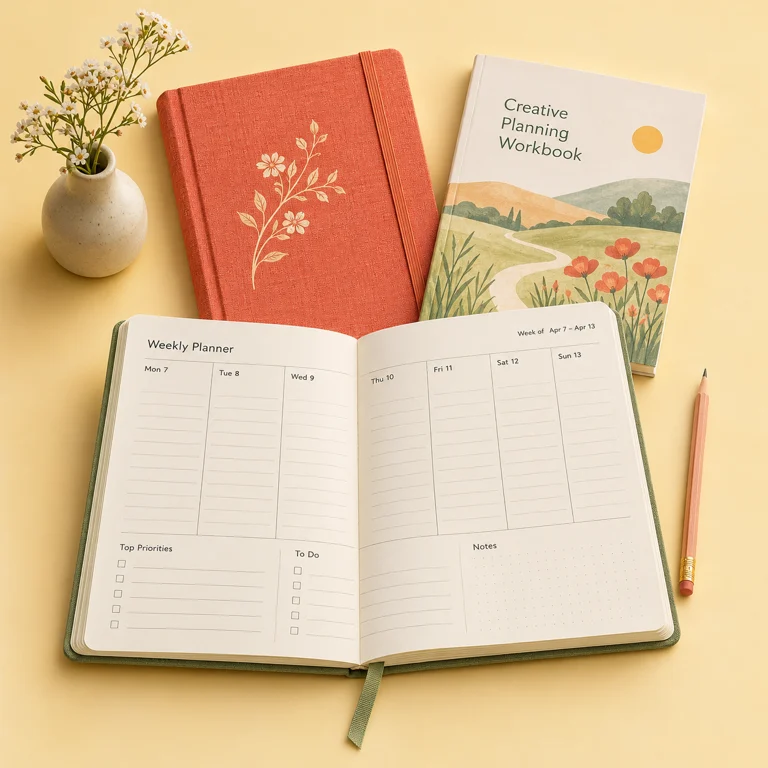
What you end up with.
- A print-ready PDF
- Checked for pages and margins
- Editable source pages
- In Studio, for updates and variants
- Listing images
- Spreads designed for your listing
- Listing copy
- What’s inside and how to print it
How to do it in oddPOD.
Each step names the tool it uses.
Plan
Decide who it’s for and what you’ll make.
Create
Design the artwork, pages and products.
Prepare
Get every product ready to list.
Launch
Hand off to your shop and tell people.
Handled outside oddPOD: uploading files and publishing the listing in your shop; delivering the download to buyers (your shop does this); marketplace fees, file-size limits and listing rules.
Where to begin.
Starting points, not promises. Pick one you can reach and make it well.
Weekly planner for one job
Teachers, nurses, freelancers
Project planner
Renovation, wedding or garden
Habit and routine planner
Built around one routine
Budget planner
Clear tables, plain language
Questions.
All questionsAre the planners fillable PDFs?
No. They’re for printing and filling in by hand.
Can I update a planner later?
Yes. Edit the pages in Studio and export again; oddPOD flags when a download needs updating.
What page sizes can I use?
Choose the size in the product brief. Check what your buyers are likely to print on.
More you can make.
Make your first printable planners.
Start with an idea, a design you already have, or a client brief. oddPOD helps with everything after.